The HumanAI platform
AI agents that work as a team.
Coordinate your team's AI agents, with each person's own accounts and the project's rules. Work carries on with the laptop closed; when it needs a decision, it reaches the phone.
From request to result
- 01RequestA person or a ticket says what is needed and how it will be checked.
- 02AgentThe agent works in the person's environment, under the project's rules.
- 03ApprovalAnything sensitive stops and waits for whoever decides.
- 04ResultA reviewed delivery, with evidence on the ticket, confirmed by the validator.
Works with
- Claude
- OpenAI Codex
- Kimi
- Jira
- Confluence
- Azure DevOps
- Databricks
- Microsoft Fabric
- Power BI
AI agents that carry out work within the HumanAI platform: Claude, OpenAI Codex and Kimi.
Tools integrated into the cockpit: Jira, Confluence and Azure DevOps.
Capabilities available through APIs: Databricks, Microsoft Fabric and Power BI.
All trademarks and logos shown belong to their respective owners. Their inclusion indicates technical compatibility and does not imply affiliation, sponsorship or endorsement of HumanAI by those owners.
A day on the platform
From the morning summary to the sprint, without switching tools
- 01
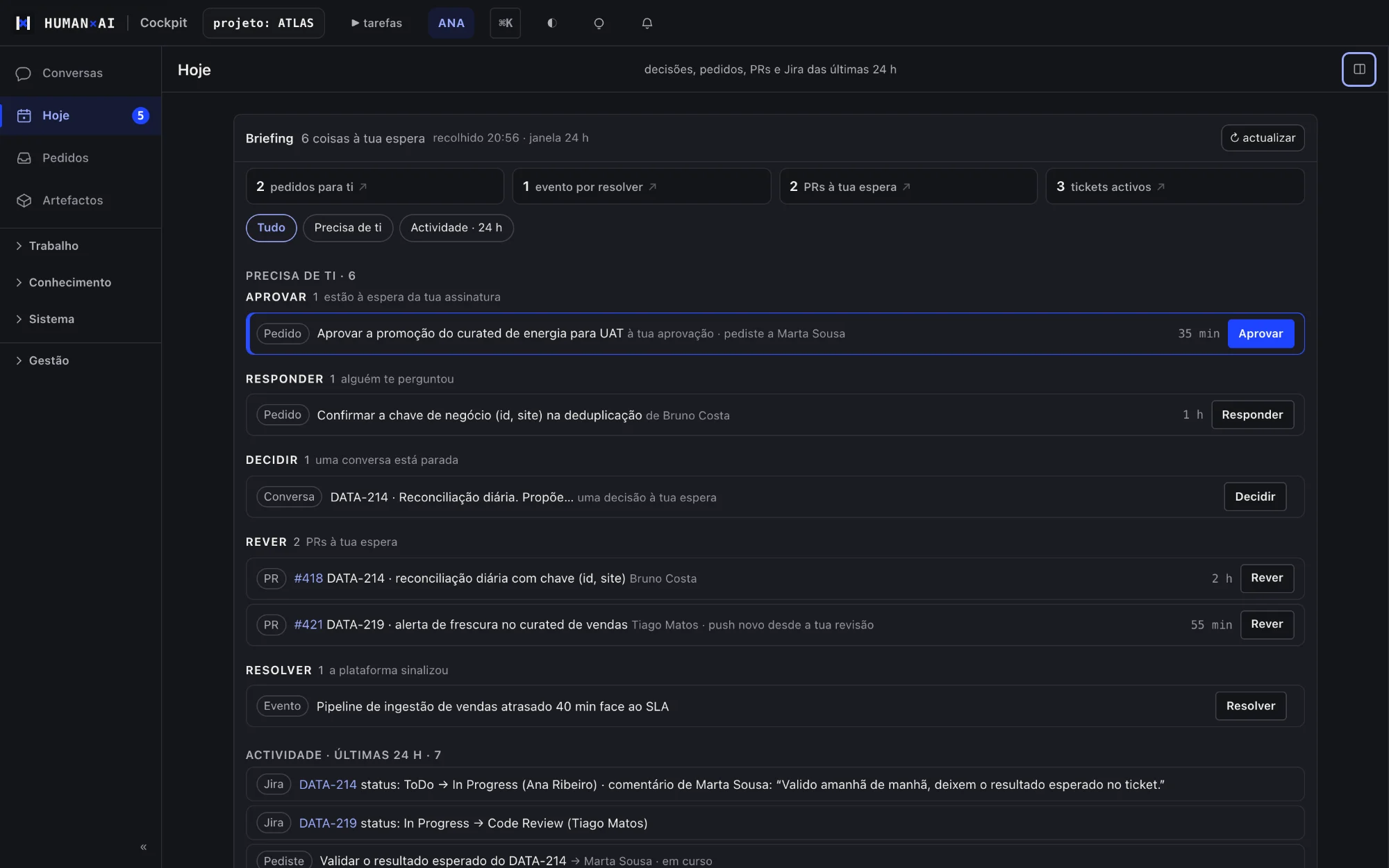
9 am, Today
Ana opens the cockpit and sees what changed in the last 24 hours: requests waiting for her, pull requests and Jira, each source with the time it was read.
- 02
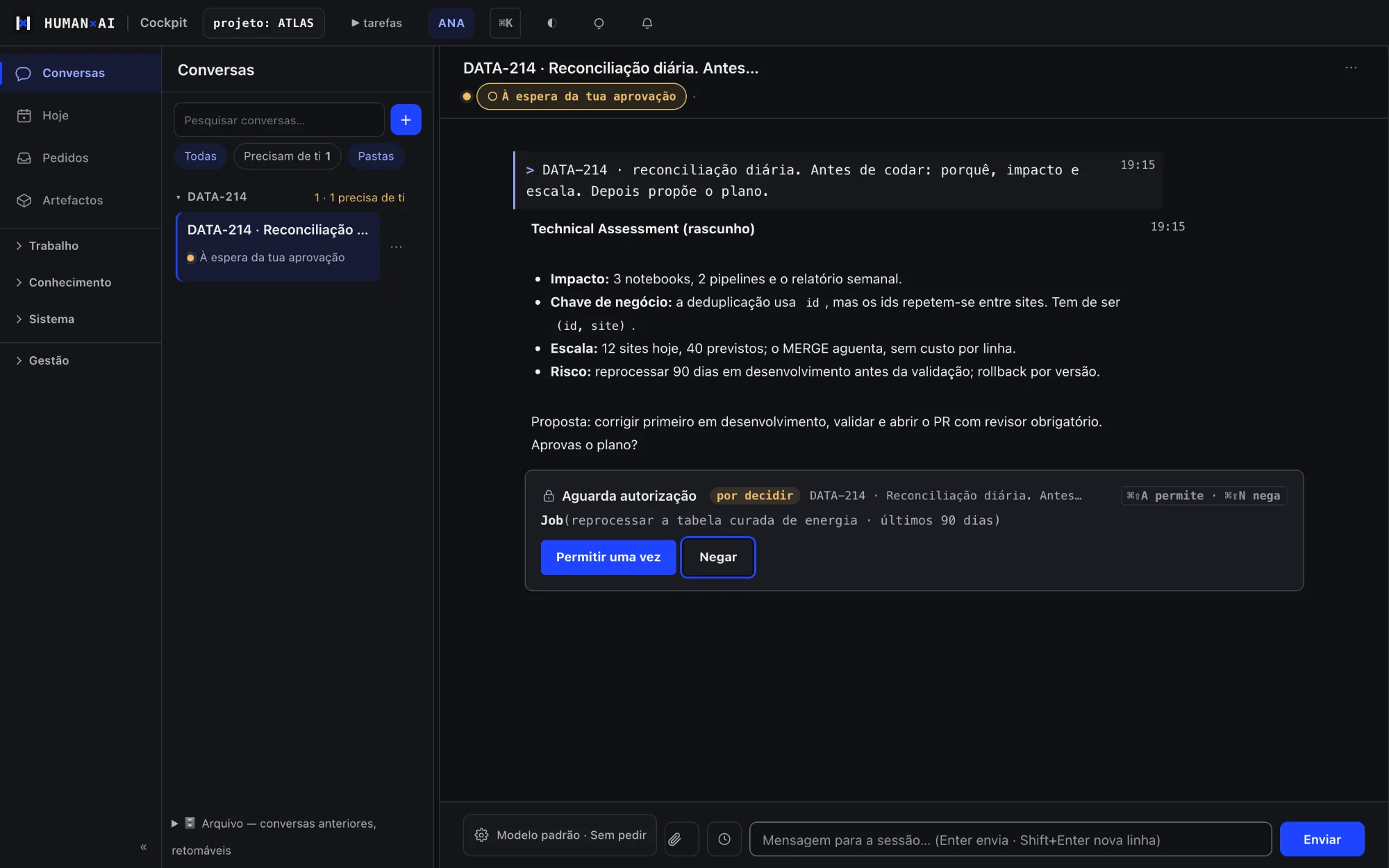
The agent proposes, Ana decides
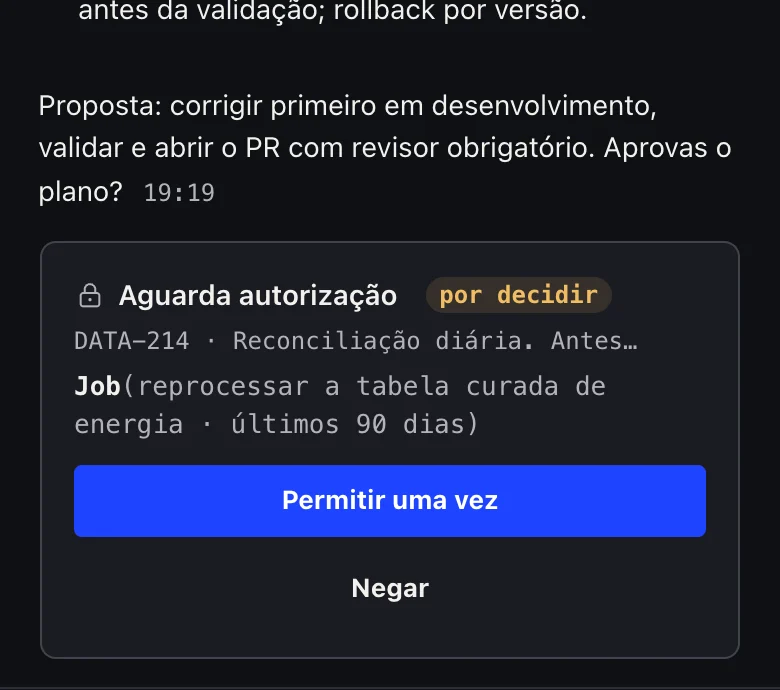
She asks the agent to assess DATA-214. The agent reads the ticket, writes the Technical Assessment and stops before reprocessing data, waiting for Allow.
- 03
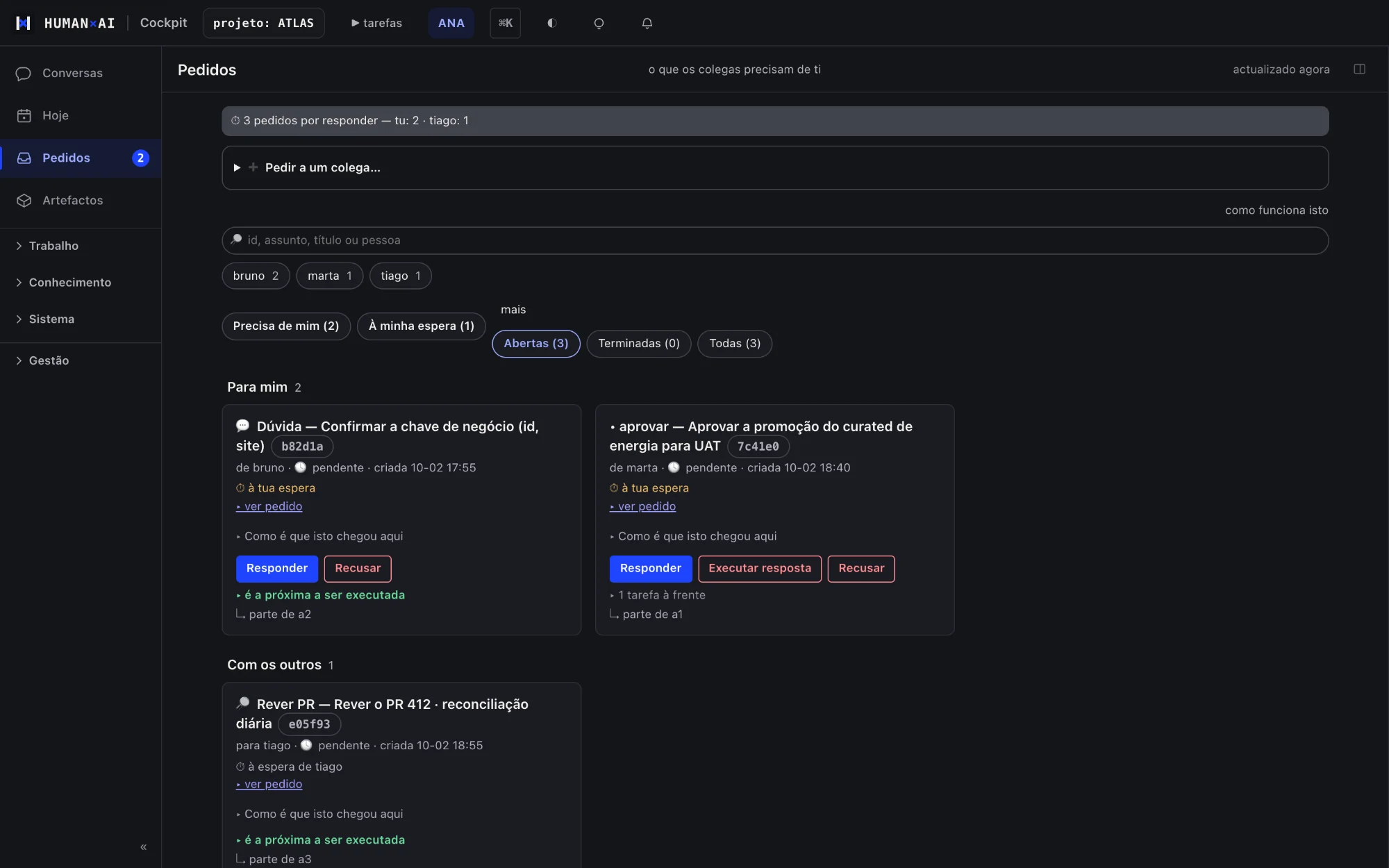
Colleagues answer right there
Marta asks for approval to promote to UAT and Bruno for a decision on the business key. The answers go back to the sessions that asked.
- 04
The sprint moves on its own
The sprint plan dispatches the next ticket when the previous one is done, and shows what is waiting on a person.
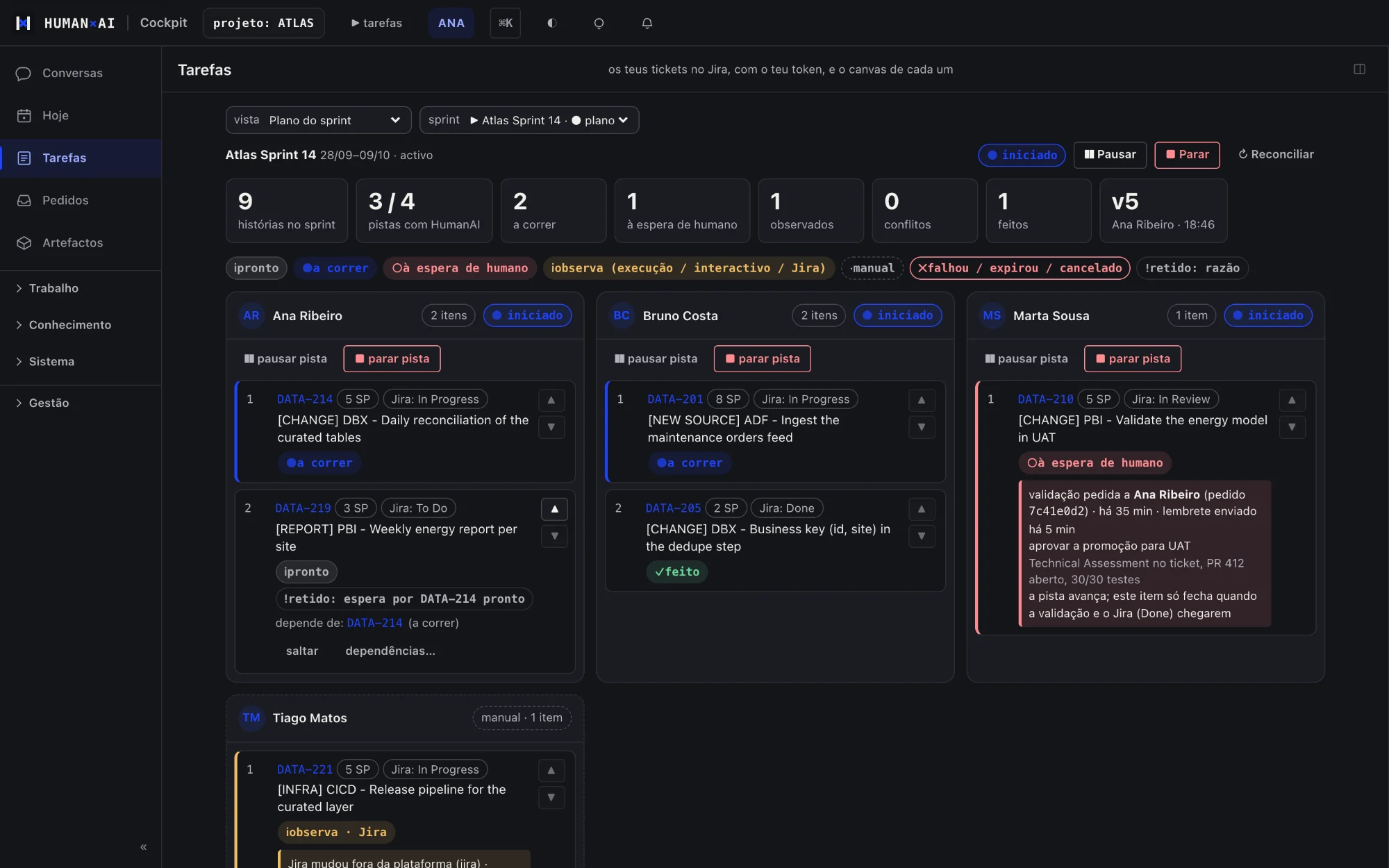


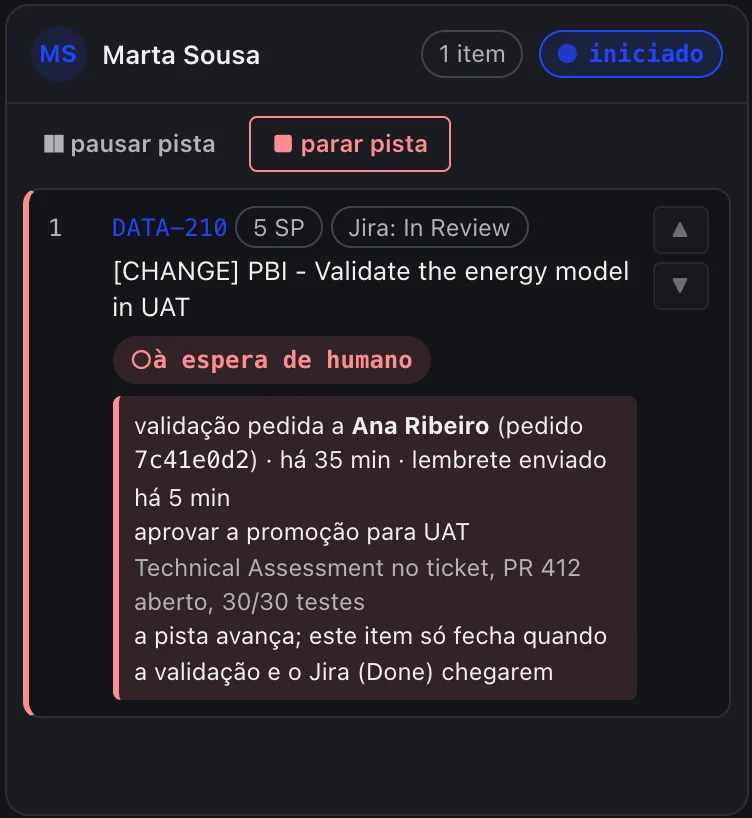
Real cockpit, shown in Portuguese, with demo data; technical details omitted.
Why there is nothing like it
What the platform adds to agents used on their own
Claude, Codex or Copilot used on their own give each person an assistant. The HumanAI platform adds what a team needs to work with them:
Review and approval requests between colleagues
One person's agent can ask another person for a review, a decision or an approval, and picks up on its own when the answer arrives.
Decisions stay with the decider
A production approval is signed by the person responsible, with their own credential. Nobody approves on someone else's behalf.
Carries on with another available account
When an account or an agent hits its limit, work carries on with another account or agent, and the conversation says why.
Team memory
What one person learns reaches the agents of colleagues on the same project, after a quality filter.
Project rules in every agent
Workflow, coding standards, deploy validation and credential governance, applied to every agent.
Data rows stay in the client's systems
As a platform rule, data rows are not copied into documents, deliverables or the team's knowledge; only metadata and aggregates leave. What is sent to a model goes to the provider of the chosen agent.
Bring your own licences
The subscriptions your team already pays for, with no hidden costs
Everyone connects their own agent accounts. The platform does not resell models or mix accounts, and work carries on with another available account when one runs out.
Your accounts, your login
Everyone connects the agent subscriptions they already have, signing in themselves.
More than one account per agent
Separate accounts, each with its own credentials.
The best model first
It starts with the best model the account can use and moves to the next one when needed.
Carries on at the limit
When an account hits its limit, work moves to the next account or agent, with a line explaining it.
Respects the reset date
An exhausted account is set aside until the date its provider gives, instead of being retried every half hour.
Measured usage
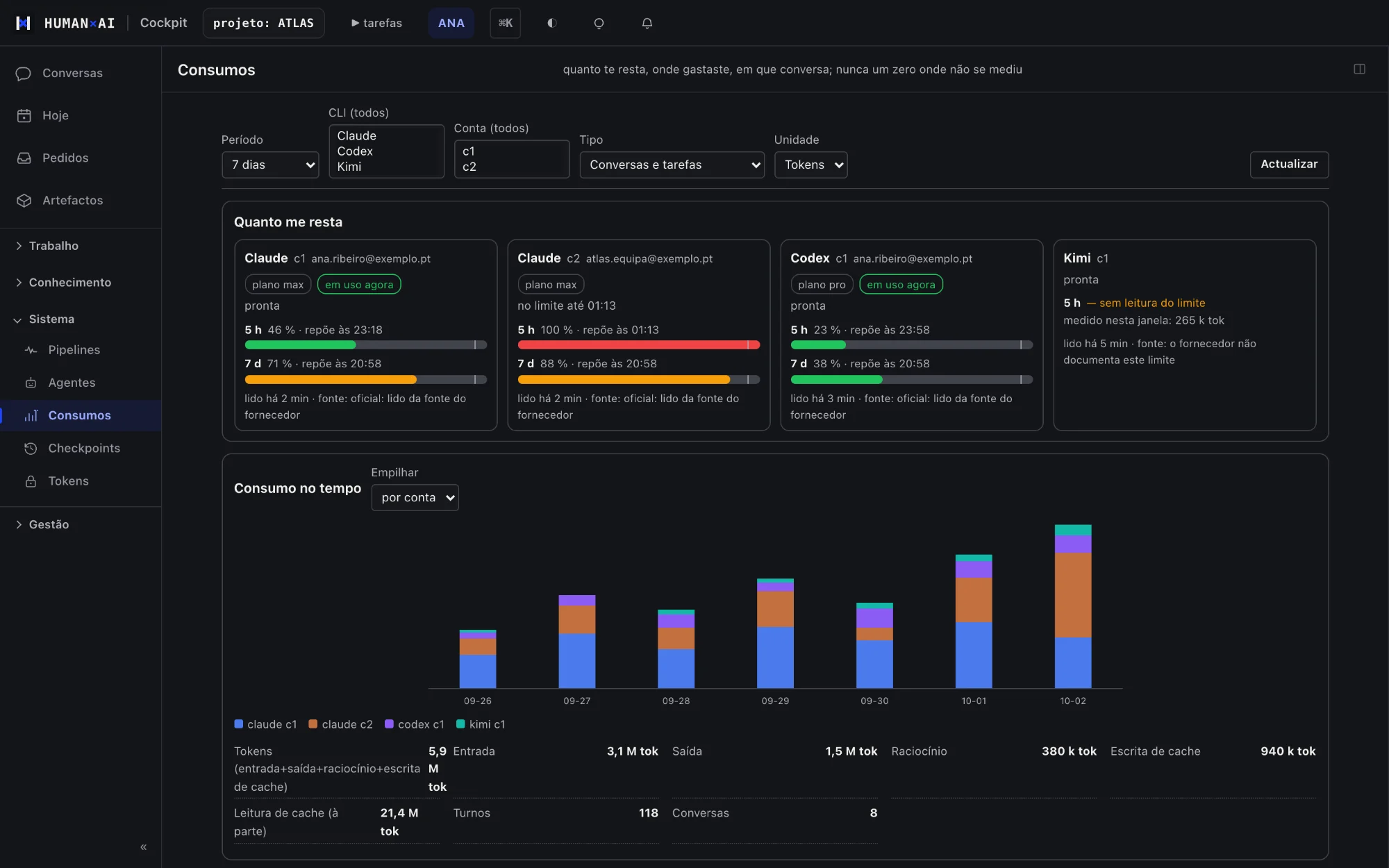
What is left, where it went and in which conversation. Anything not measured shows as «not measured», never as zero.
#01
Agents and conversations
The problem. An agent in a terminal serves one person on one machine. Close the laptop and the work stops; switch device and you lose the thread.
How it works
- The person opens a conversation in the browser or on the phone.
- The agent runs in their environment, not in the browser.
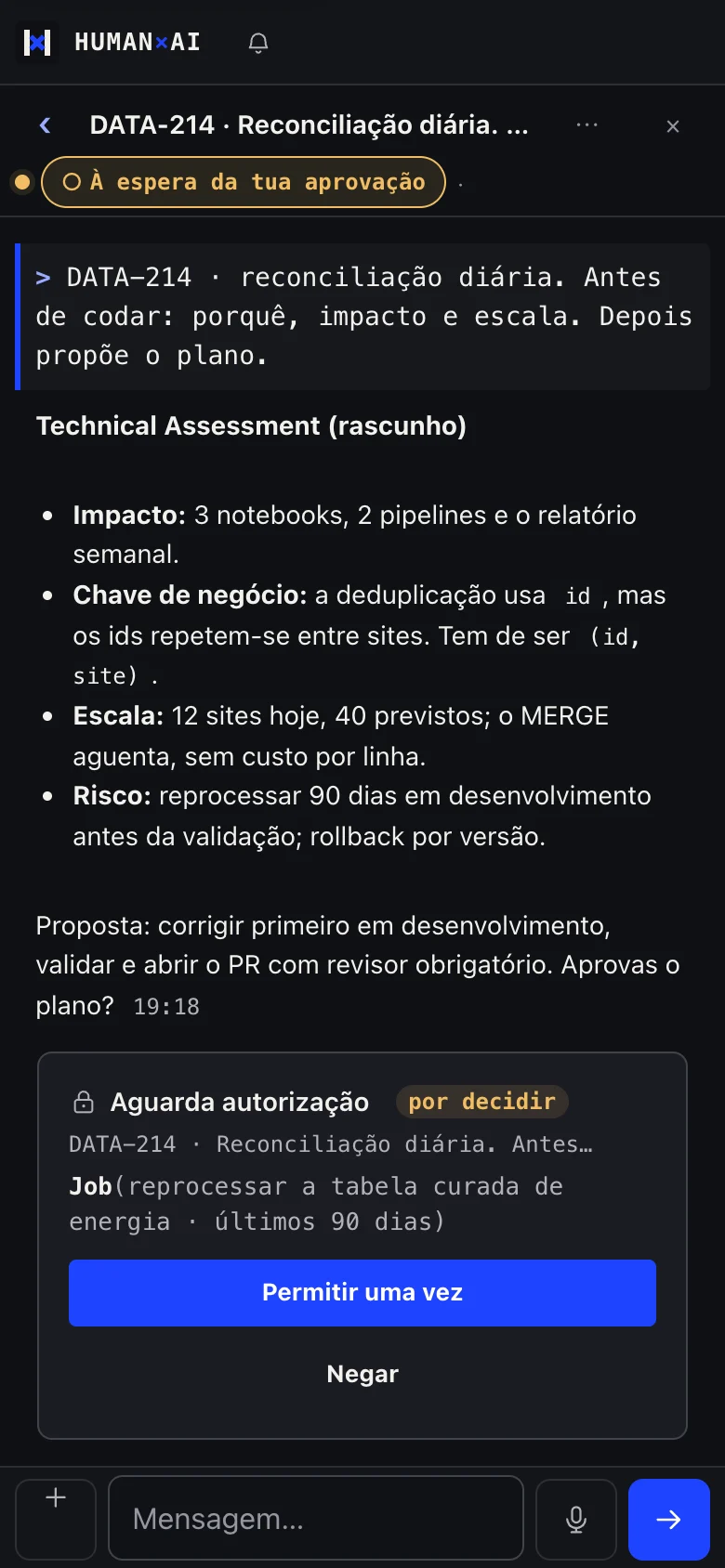
- Only what can't be undone asks for confirmation, on an Approve/Deny card.
- The conversation carries on with the browser closed and resumes where it left off.
What sets it apart. The agent works even when the person is away, and the person decides how far it may go alone.
What it includes (11)
- Several agents in one place, choosing agent and model per conversation
- Plan mode before acting
- Autonomy budget: limits on actions and cost per session
- Restore points with recovery
- Attachments, templates, command palette and keyboard shortcuts
- Speech to text next to Send, in real time, on computer and phone; audio processed in the EU, with a single-use key per dictation
- Automatic recovery of interrupted conversations
- A new conversation for another topic while a long task runs in the background
- Pre-started sessions so there is no wait
- File explorer and deliverables with preview
- First steps for newcomers: what is left to connect and set up
#02
Licences, accounts and usage
The problem. Teams already pay for model subscriptions. A platform that forces its own keys hides costs, mixes accounts and loses track of who spent what.
How it works
- Everyone connects their agent accounts in the cockpit, signing in themselves.
- They can have more than one account per agent, each kept apart.
- They choose the order of agents and, for each one, the chain of models.
- When an account hits its limit, it is set aside until its reset date and work moves to the next one.
- They see measured usage per account and per subscription.
What sets it apart. No hidden model costs and no shared keys. Everyone pays for and controls what they use, and work carries on with another available account when one runs out.
What it includes (7)
- Agent sign-in from the cockpit, done by the person
- Several accounts per agent, with separate credentials
- Automatic model chain: the best model the account can use comes first
- Automatic hand-over between accounts and agents, with a line in the conversation explaining it
- Respect for each provider's reset date
- Usage: what is left, where it went, in which conversation, in tokens; money only when billed per token; «not measured» never shows as zero
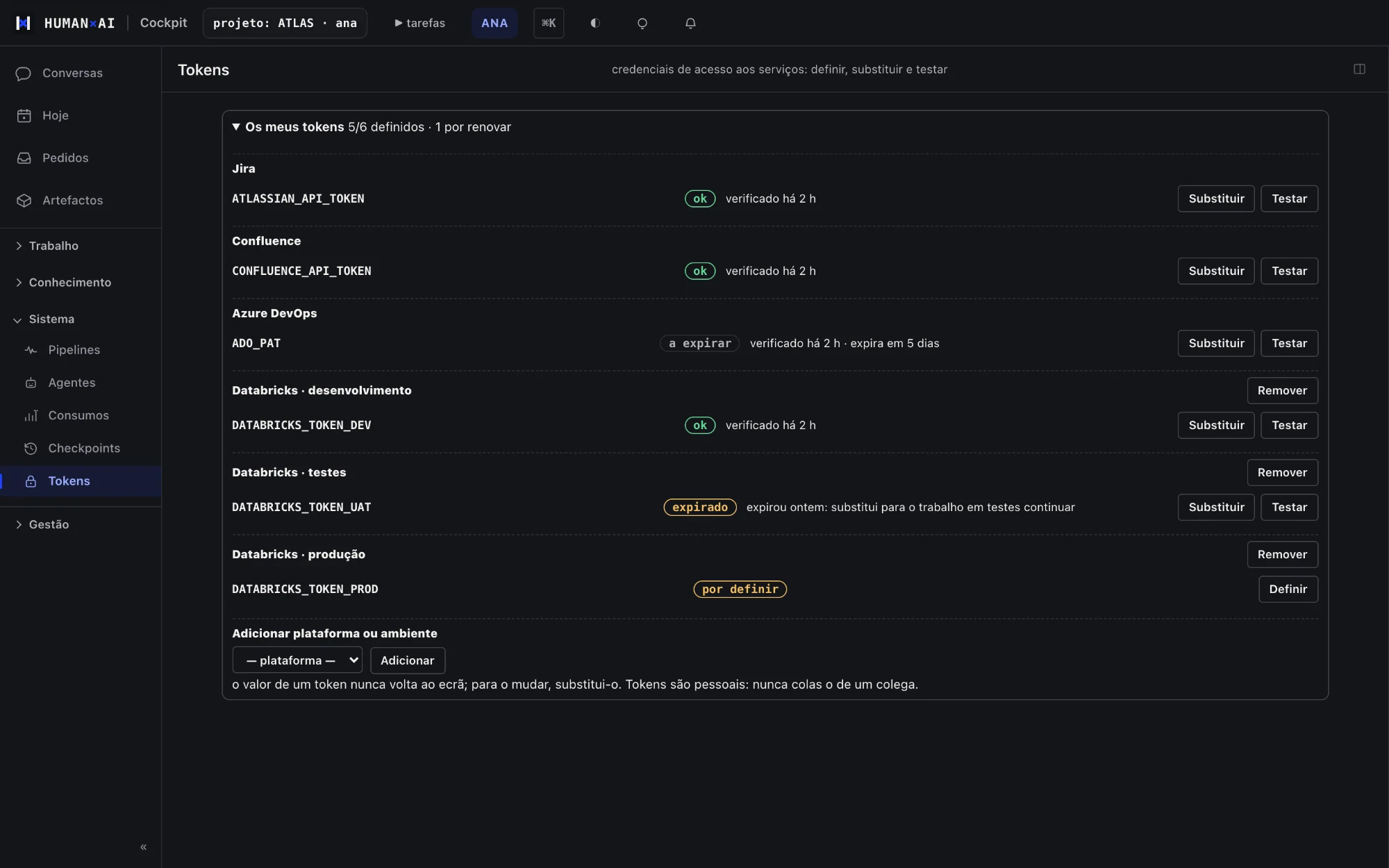
- Personal service credentials (Azure DevOps, Jira, Confluence, Databricks), set and tested by the person
#03
Coordination between people and agents
The problem. On a project, a lot of time goes into waiting for someone: an approval, a review, an answer. With agents, the problem multiplies.
How it works
- One person's agent sends a request to another: what it checked, what it needs, what comes next.
- The other person gets it in the cockpit and on the phone, and answers or lets their own agent handle it, within the autonomy they set.
- When the answer arrives, the requester's session picks up on its own.
- Work for another environment (development, testing, production) goes as a self-contained task, with an expected outcome and a check.
What sets it apart. Every request has an owner, proof of execution and a decision that stays with a person.
What it includes (9)
- Directed requests with type, reference and history
- Per-person autonomy: what their agent accepts on its own from each colleague
- Automatic resume within limits; destructive production work never resumes on its own
- Production approvals signed by the person responsible, with separation of duties
- Pull request review with auto-complete and a mandatory reviewer
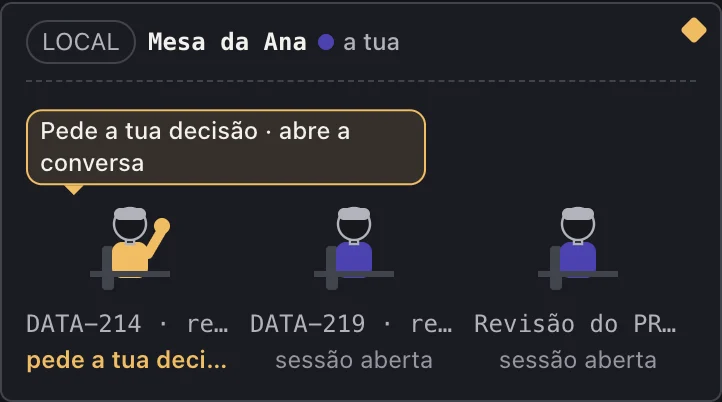
- The Room: who is working, on what and with whom, from real signals
- Permission reservations for sensitive actions
- Precedents: similar decisions taken before
- Automatic clean-up of repeated questions and flagging of stalled requests
#04
Planning, Jira and Azure DevOps
The problem. The plan lives in one tool, the code in another and approvals in a third. Nobody sees the right order of execution.
How it works
- Everyone sees their Jira tickets in the cockpit, with their own credential.
- The manager builds the sprint plan with the order of execution and dependencies.
- The plan dispatches work to the agents and follows progress.
- Pull requests, runs and approvals show up in one place.
What sets it apart. The plan triggers the agents' work and follows it through to the end.
What it includes (6)
- Tasks with sprint, burndown, ticket canvas and «start on a machine»
- Sprint plan with dependencies, per-person lanes and reminders
- Automatic sprint cycle, with manual trigger
- Pull requests and runs: vote, comment, review
- Azure DevOps events that become work or a notice
- Sprint documentation and archive, portfolio and dossier
#05
Today
The problem. The first hour of the day goes into opening several tools to find out what changed.
How it works
- On opening the cockpit, everyone sees a summary of the last 24 hours.
- Each source shows when it was read.
- What needs a decision comes first.
What sets it apart. It only states what it observed.
What it includes (2)
- A per-person morning summary that never makes things up: what was not collected is stated
- Platform activity and what is new
#06
Pipeline health
The problem. A pipeline fails overnight and nobody finds out until a report comes out wrong.
How it works
- Pipeline status is read with each person's access.
- A red pipeline opens a task with an owner.
- When it turns green again, the work closes.
What sets it apart. An alert arrives with an owner and the next step.
What it includes (2)
- Pipeline status per platform
- Alerts that turn into tasks with an owner

#07
Collective knowledge
The problem. What one person discovers stays in their head or in a chat nobody reads again. The agents repeat the same mistakes.
How it works
- At the end of relevant work, the agent proposes a learning with evidence.
- Overnight, proposals go through checks: security, confidence, duplicates and an automated quality review.
- Approved ones are suggested to everyone's agents at the right moment.
- What was shown, read and used is measured.
What sets it apart. Knowledge grows with the work and is filtered before it reaches everyone.
What it includes (7)
- Learnings suggested automatically with every request to the agent
- Overnight approval funnel, and proposals to approve, merge or reject
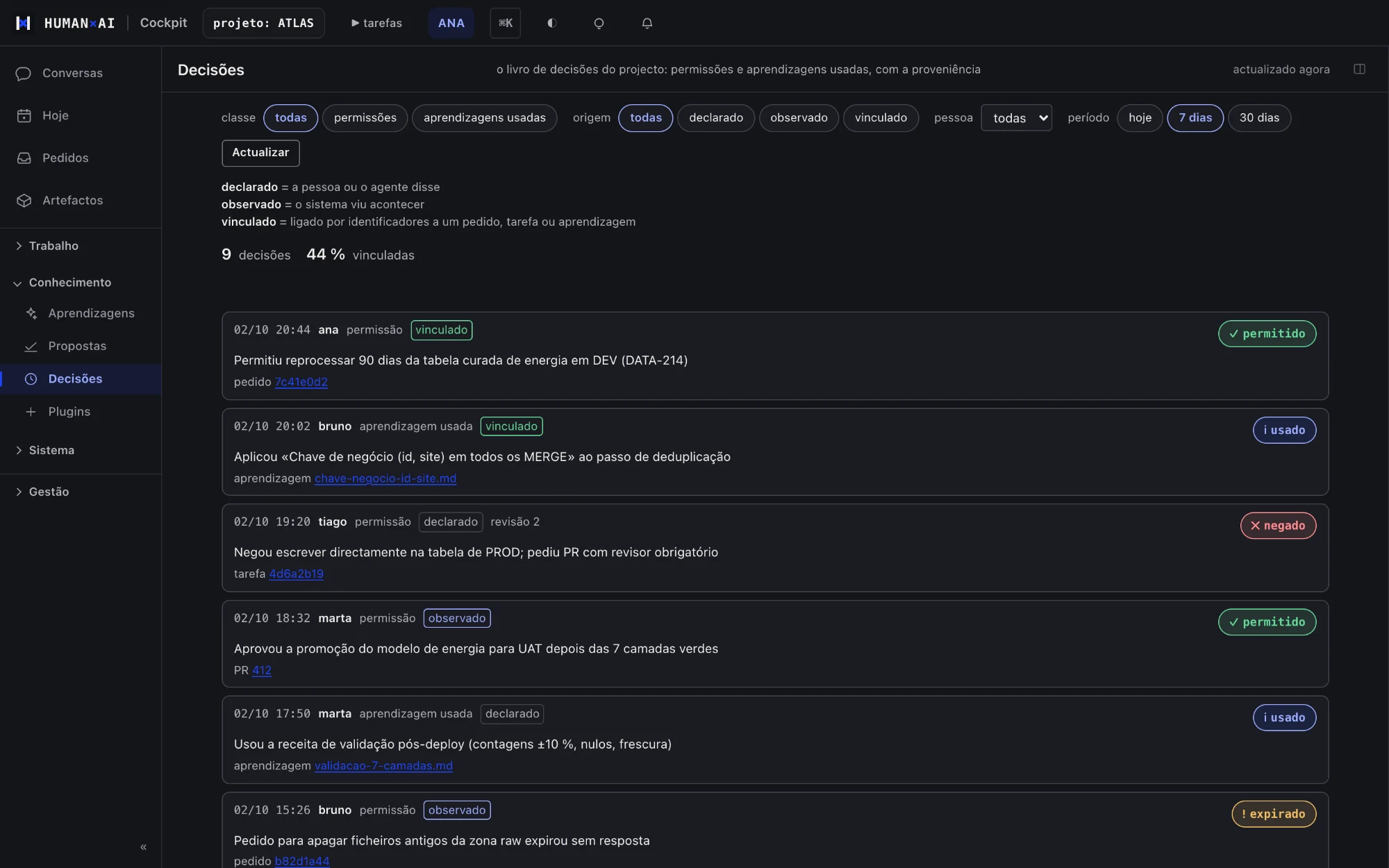
- A decision log with provenance
- Team skills for data engineering, Power BI, Microsoft Fabric and process
- Team rules applied to every agent
- Knowledge return measured, without self-reinforcement
- Themes, knowledge graph and code map
#08
Per-project plugins
The problem. Everyone installs extensions on their own, and nobody knows what the team's agents have available.
How it works
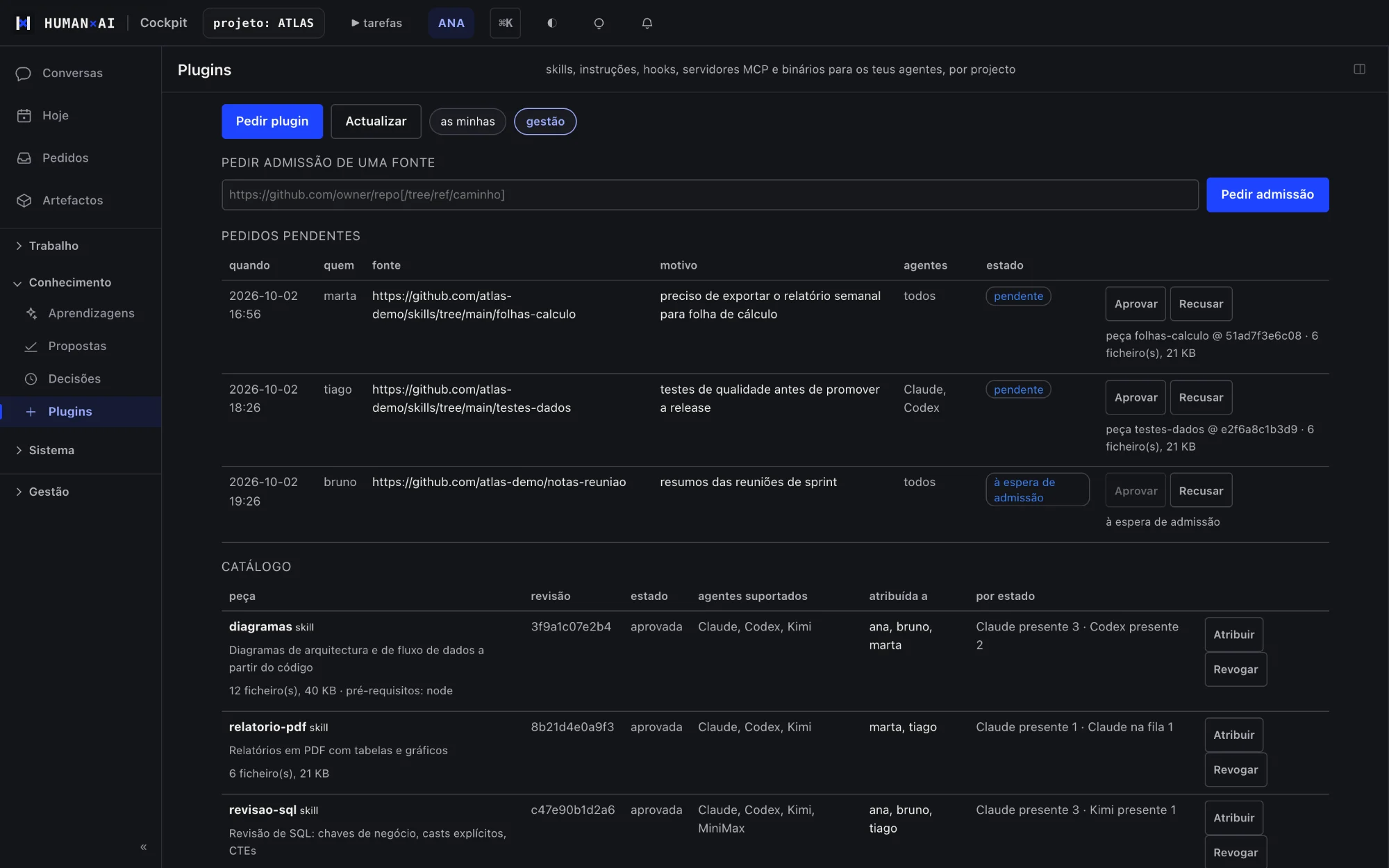
- A person requests a skill, instruction or tool.
- The project approves or rejects it.
- The platform distributes it to whoever should have it and observes its state.
What sets it apart. The team's agents have the same tools, and only approved ones.
What it includes (3)
- A per-project catalogue
- Request, approval, assignment and revocation
- State observed in each environment
#09
Meetings and contacts
The problem. Meetings produce decisions and commitments that get lost, and nobody knows who talks to whom at the client.
How it works
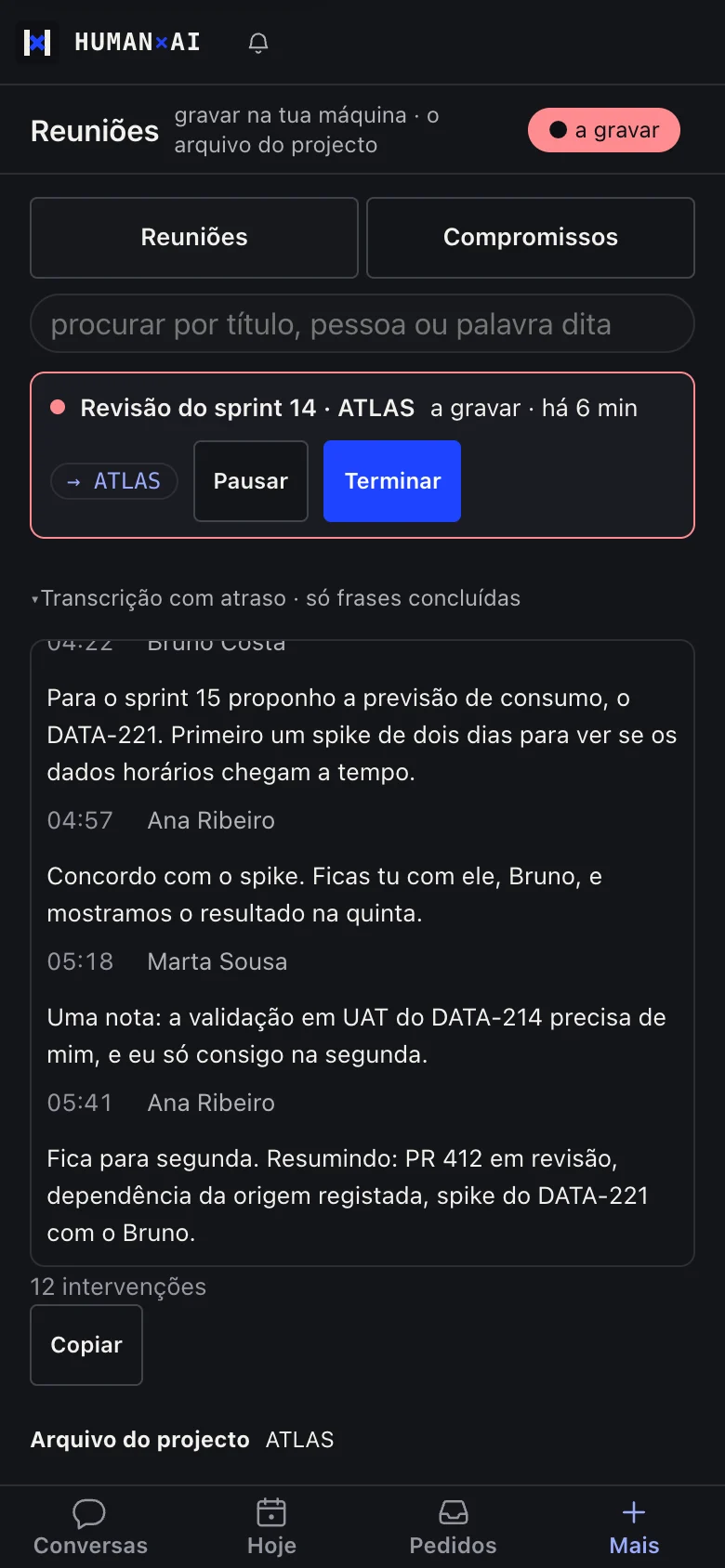
- The meeting is detected on the person's computer, and they decide whether to record.
- The transcript identifies who is speaking.
- Commitments and tasks move from the meeting into the work.
What sets it apart. The meeting stays linked to the work and the people of the project.
What it includes (5)
- Recording on a single machine, with consent
- Incremental transcript with speakers
- Commitments, tasks, minutes for Confluence and related stories
- Archive and analysis of the project's meetings
- Contacts: people and organisations, relationships and profile
#10
Reports and suggestions
The problem. People who find a problem rarely report it, because it takes effort and nobody knows what happens next.
How it works
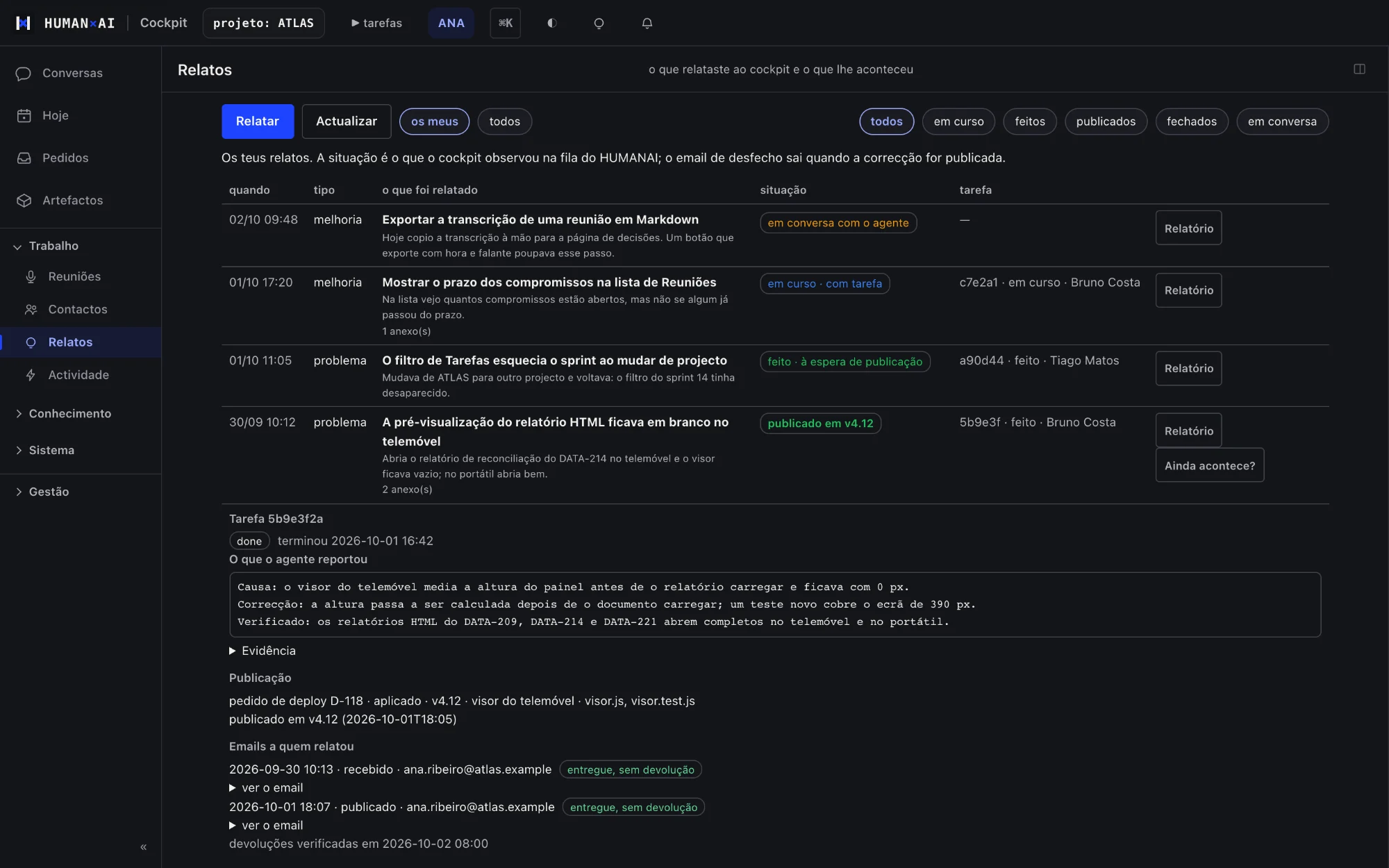
- A button on any screen opens the report with the context already filled in.
- The person sees what goes and can switch off each part.
- Then they follow the outcome.
What sets it apart. The person sees all the context in the report and chooses what to send.
What it includes (3)
- Report problems and suggest improvements, with context and attachments
- Receipt, outcome and merging of duplicates
- A suggestion box
#11
Team, access and administration
The problem. Giving a new person access usually takes days and leaves loose ends.
How it works
- The manager invites the person; they get an email, sign in and change the password.
- The manager requests a working environment for them; administration approves it.
- The person connects their agents and credentials, guided by the first steps.
What sets it apart. From invitation to first conversation, with no requests on the side.
What it includes (8)
- Project people with their access status and next step
- Email onboarding with delivery status
- Sign in with Google, once linked to the HumanAI account; it goes straight to the cockpit
- My account: profile, Google account (link and unlink), password, email recovery, credentials
- Optional, deletable work preferences
- Roles, positions and menus per person
- Create a project and approve environments with a second factor
- Per-project branding

#12
Security and governance
The problem. Agents with access to client systems need more control, not less.
How it works
- Every agent action goes through the platform's guards.
- Anything sensitive asks for a person.
- Everything is recorded for audit.
What sets it apart. These controls run on every agent action, without relying on anyone to remember them.
What it includes (8)
- A personal, isolated environment that keeps working with the laptop closed
- Personal credentials, never shared, with automatic detection of sharing
- A secrets guard that blocks keys and passwords before they reach a file
- Client data rows kept out of documents and team knowledge: only metadata and aggregates
- Separation between projects, checked before every distribution
- Human authorship: work goes out signed by the person
- Second factor on platform approvals and an audit trail of actions
- Content-free notifications: the phone alert carries no project data
#13
Mobile and notifications
The problem. The approval that blocks a delivery arrives when the person is away from the computer.
How it works
- Install the cockpit as an app.
- A notification arrives when someone needs you.
- Approve or answer right there.
What sets it apart. Work does not wait for someone to get back to the computer.
What it includes (5)
- An installable app on phone and computer, with every section
- Light and dark mode
- Speech to text on the phone too
- Notifications when someone needs you, with no project data in the alert
- Approve, answer and follow up without opening the laptop
#14
What the work produces
The problem. What AI produces often stays in a chat, far from the systems the team works in.
How it works
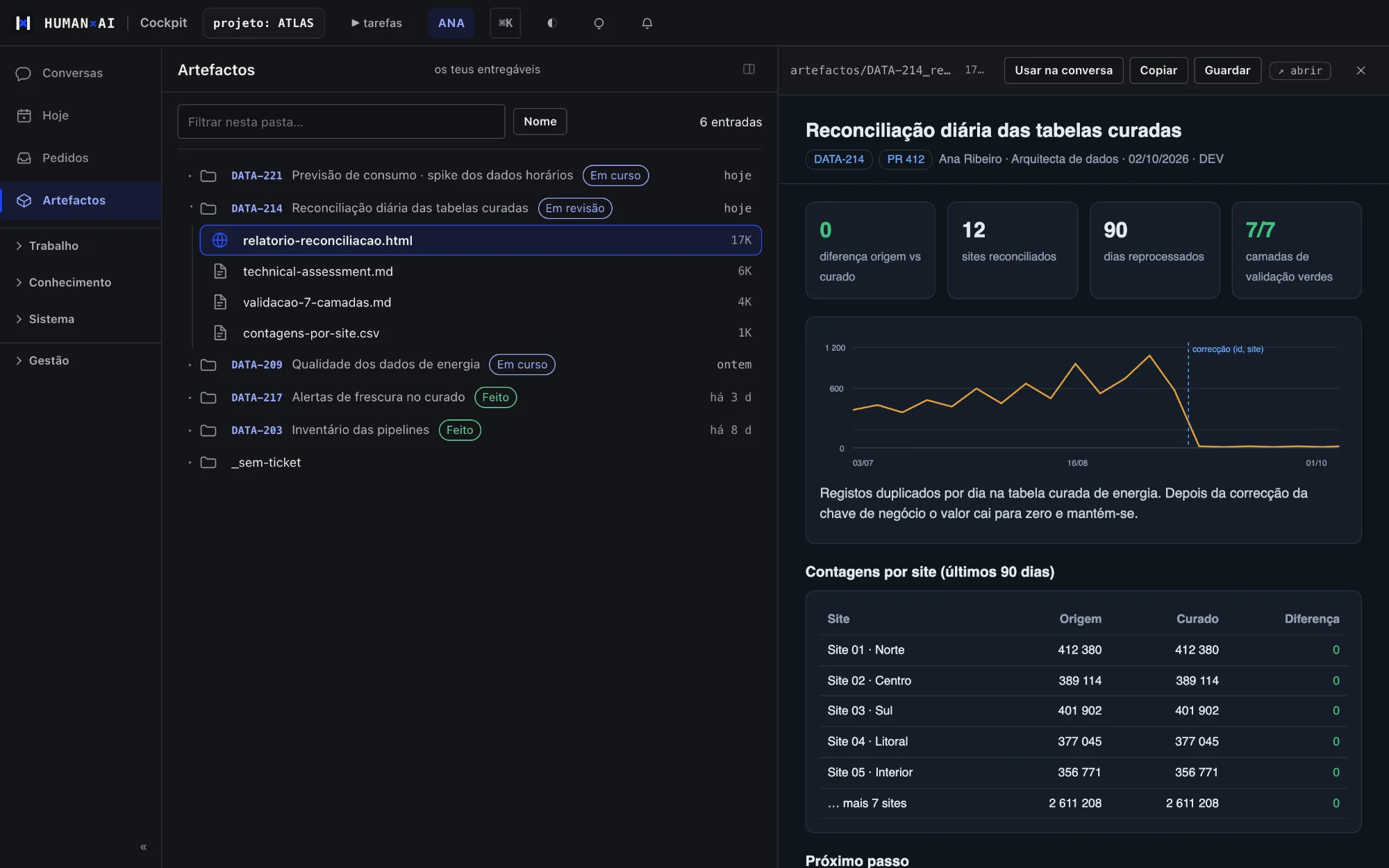
- Work stays linked to the ticket.
- Deliverables follow the team's standard.
- They live in the client's systems: Jira, Confluence and the repository.
What sets it apart. The result stays where the team already works, not in a chat.
What it includes (4)
- Bilingual, offline HTML reports with charts
- Tickets and documentation pages with the code included
- Architecture and flow diagrams
- Data engineering tools ready to use in every environment
One measured result
Median time to complete a coordination request
Computed over 651 completed requests created between 3 September and 2 October 2026, on one client project in production. Excludes requests still open.
Includes automated requests and requests to people, so it is not human response time. It does not measure delivery time or improvement over the previous process.
Implementation and support
Our team gets the platform running with you
Kick-off
Environments, each person's access, project rules and the first conversations, on the first day of working together.
Integration
Jira, Azure DevOps, Databricks and Microsoft Fabric connected with each person's own credential.
Ongoing support
Data engineering done with us on the platform, with assessment before code and human validation before «done».
Frequently asked questions
What is the HumanAI platform?
A work platform for data and engineering teams that work with AI agents. It brings together conversations with the agents, coordination between people, the team's knowledge and the project's rules.
Which AI agents does it support?
Today it runs work with Claude, OpenAI Codex and Kimi. Everyone uses their own accounts.
Can the AI act without approval?
Within the agreed autonomy limits, yes. Anything that needs approval, and everything going to production, waits for a person.
Does client data leave the client's systems?
As a platform rule, data rows are not copied into documents or the team's knowledge; only metadata and aggregates leave. What is sent to an AI model goes to the provider of the chosen agent; the Use of AI page explains the rest.
How do we know a task is done?
Every request says how it is checked and who validates it. It only closes after that confirmation.
See one request from start to finish
In the demo you follow one request through to delivery sign-off, in the real cockpit with demo data.